If you need access to a shared mailbox for your bureau, please have your supervisor place a ticket for you
Once you have gotten access, it should autopopulate in the desktop version of Outlook
If you prefer to use the web version, then you will need to add it manually.
Sign in to Outlook and right-click on your email address on the left-side tab, then select "Add shared folder or mailbox".
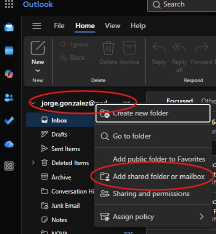
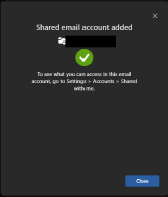
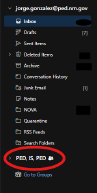
You are going to type in the email address of the shared inbox. Hit continue. If everything is good, you will receive a message that the shared email account has been added. Hit close. The shared inbox should then show up in the left column under your email address.
Was this article helpful?
That’s Great!
Thank you for your feedback
Sorry! We couldn't be helpful
Thank you for your feedback
Feedback sent
We appreciate your effort and will try to fix the article